BMW iDrive Systems Guide: How to Identify Your System and Enable CarPlay
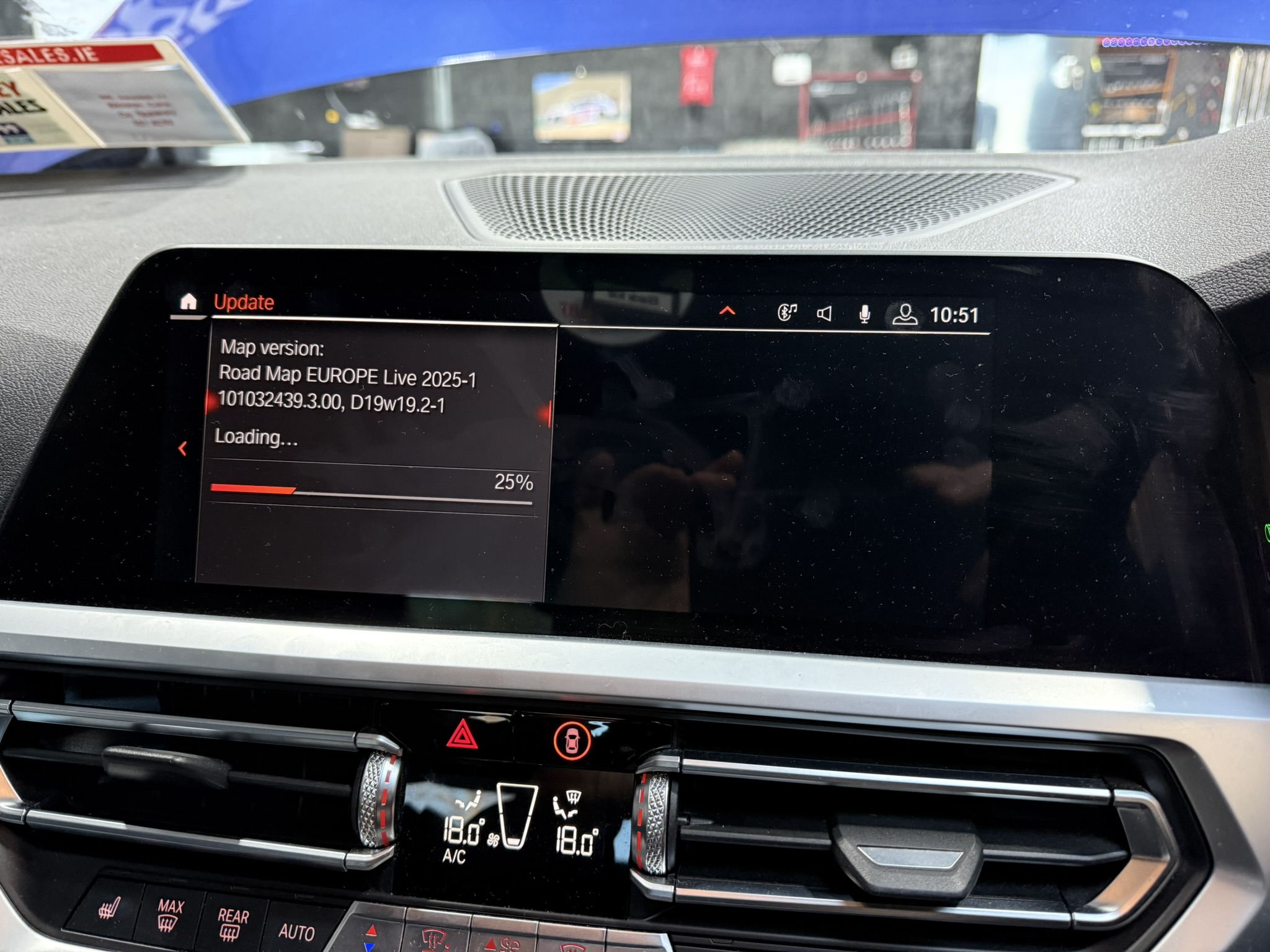
BMW iDrive Systems Guide: How to Identify Your System and Enable CarPlay
Understanding which iDrive system your BMW has is crucial when considering upgrades like Apple CarPlay or Android Auto. This comprehensive guide will help you identify your system and understand what's possible for your vehicle.
Why iDrive System Identification Matters
Different iDrive systems have vastly different capabilities:
- Some support CarPlay natively, others don't
- Coding and retrofit options vary by system
- Navigation updates and map versions are system-specific
- Software features and interface design differ significantly
Let's explore each iDrive generation to help you identify which system you have.
How to Check Your iDrive Version
The easiest way to identify your exact iDrive system is through the navigation menu:
Step-by-Step Instructions:
- Enter Navigation - Press the NAV button or go to Navigation in the main menu
- Select MAP - Choose the map view
- Press the Option Button - Press the option/menu button on the iDrive controller
- Scroll to Navigation Settings - Navigate down to find Navigation Settings
- Find Version Info:
- CIC, NBT, ID4: Look for "Navigation Version"
- ID5, ID6: Look for "Position and Version"
The version number displayed will tell you exactly which system you have. If you're unsure, send us a photo and we'll help identify it.
Get Help Identifying Your System
CCC (Car Communication Computer) - iDrive 1.0
Years: 2001-2008 Models: E60, E61, E63, E64, E65, E66, E70 (early), E90, E91, E92, E93 (early)
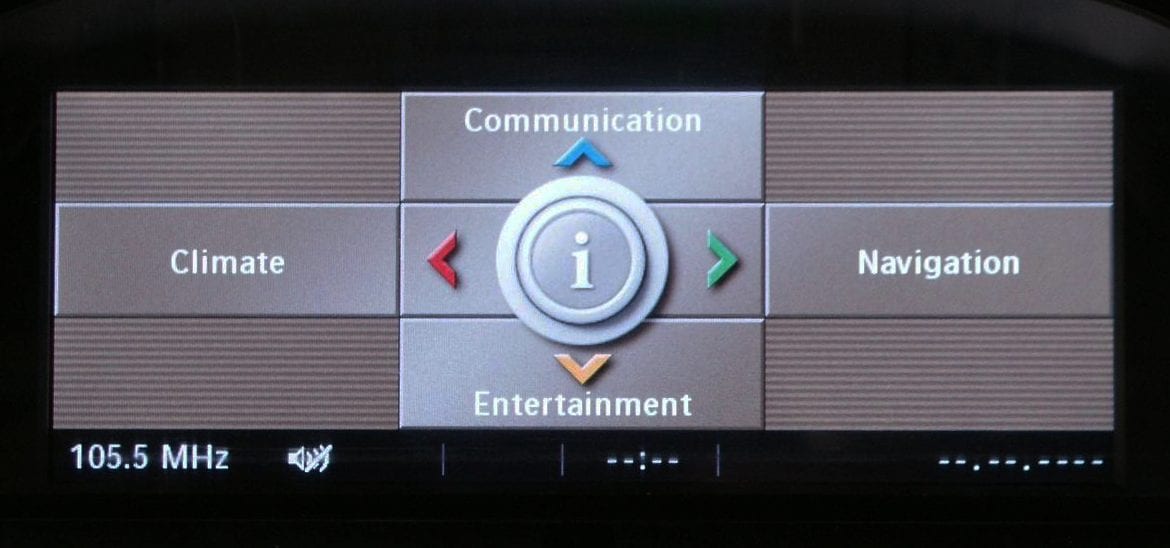
How to Identify CCC:
- Screen: 8.8" widescreen display (16:9 aspect ratio)
- Graphics: Basic, low-resolution graphics with simple icons
- Controller: Original iDrive controller without touch capability
- Menu Style: Radial menu system with categories
Key Characteristics:
- First generation of BMW's iDrive system
- No USB connectivity (only AUX input)
- CD/DVD-based navigation with separate disc
- 2D map display only
- No smartphone integration capabilities
CarPlay Options:
Native CarPlay: Not supported
Retrofit Options:
- MMI Box retrofit: From €350 fitted
- Aftermarket screen replacement
CIC (Car Information Computer) - iDrive 2.0/3.0
Years: 2008-2012 Models: E60 (late), E70, E71, E82, E84, E89, E90, E91, E92, E93, F01, F02, F07, F10, F11 (early)
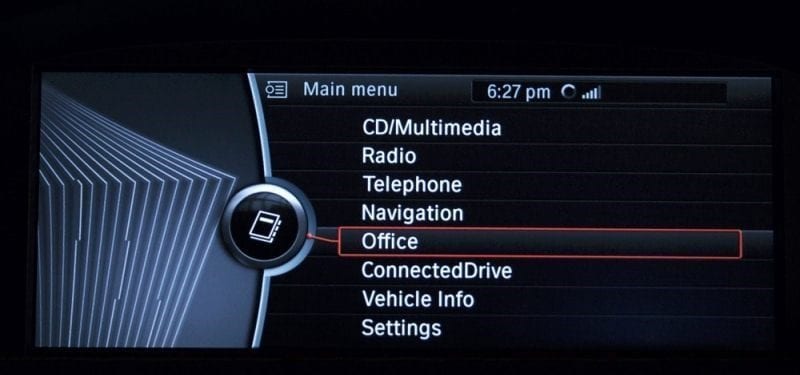
How to Identify CIC:
- Screen: 10.25" widescreen or 8.8" display depending on option
- Graphics: Improved resolution with 3D building views in navigation
- Controller: Updated iDrive controller with direct menu buttons around it
- Menu Style: Vertical list menu system
- USB Port: Yes - supports USB music playback
Key Characteristics:
- Hard drive-based navigation (no more discs)
- USB and Bluetooth audio streaming
- Voice control capability
- Real-time traffic information (with subscription)
- Split-screen functionality
- 3D navigation maps
CarPlay Options:
Native CarPlay: Not supported
Retrofit Options:
- MMI Box retrofit: From €350 fitted
- Aftermarket screen replacement
NBT (Next Big Thing) - iDrive 4.0
Years: 2012-2016 Models: F20, F21, F22, F30, F31, F32, F33, F34, F36, F10, F11 (late), F15, F16, F25, F26
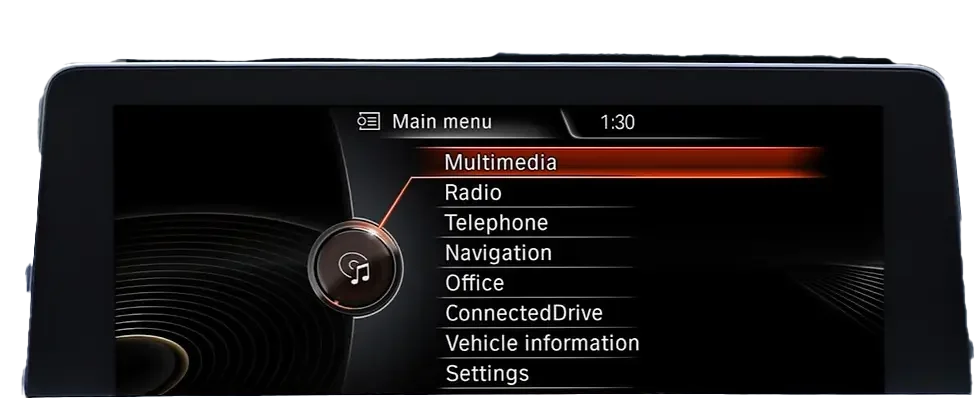
How to Identify NBT:
- Screen: 6.5", 8.8", or 10.25" depending on specification
- Graphics: High-resolution display with improved animations
- Controller: Touch-sensitive iDrive controller (write letters with finger)
- Menu Style: Vertical list menu system
- ConnectedDrive: Full BMW ConnectedDrive services
Key Characteristics:
- Touch-sensitive iDrive controller for handwriting input
- Full smartphone integration via Bluetooth
- Enhanced voice control
- Real-time traffic with re-routing
- BMW Apps integration
- Professional navigation with satellite imagery
CarPlay Options:
Native CarPlay: Not supported on standard NBT
Retrofit Options:
- MMI Box retrofit: From €250 fitted
- Aftermarket screen replacement: From €450 fitted
- NBT EVO retrofit: From €1,200 fitted
NBT EVO ID4 - The Hidden Gem
Years: 2015-2016 Models: Primarily F30/F31 (3 Series), F32/F33/F36 (4 Series), and some other F-series models from this production period
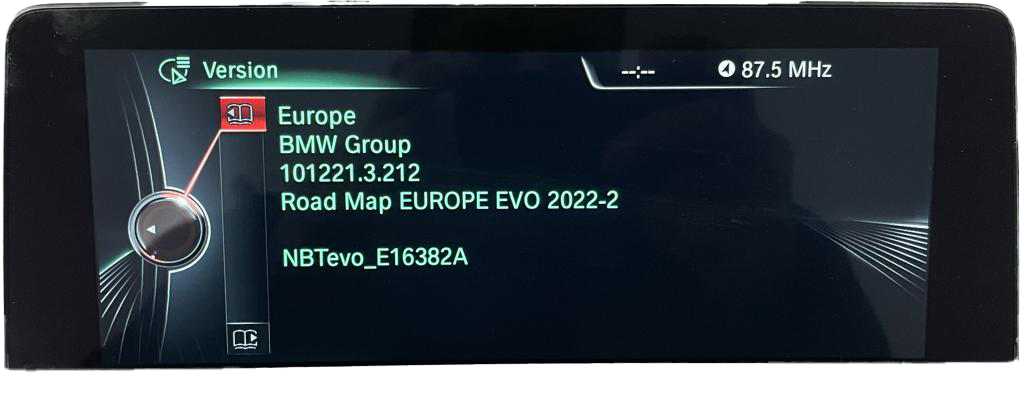
What is NBT EVO ID4?
This is where identifying your system becomes especially important. NBT EVO ID4 looks exactly like standard NBT from the outside - same interface, same menu style. However, underneath it has NBT EVO hardware.
Why This Matters:
NBT EVO ID4 systems can be flashed with NBT EVO ID5 or ID6 software to enable native Apple CarPlay - no hardware changes required!
How to Identify NBT EVO ID4:
The only reliable way is to check your navigation version. If you have:
- Production date of 2015-2016
- 3 Series (F30/F31) or 4 Series (F32/F33/F36)
- NBT-style vertical menu interface
There's a good chance you have NBT EVO ID4 hardware that can be upgraded.
CarPlay Options:
Native CarPlay: YES - Via software flash to ID5/ID6!
Our Service:
- ID4 to ID5/ID6 software flash: €350
- Enables native fullscreen wireless CarPlay
- No hardware modifications needed
- Takes approximately 2-3 hours
This is significantly more affordable than a full NBT EVO hardware retrofit and gives you the same CarPlay functionality.
NBT EVO (NBT Evolution) - iDrive 5.0/6.0
Years: 2016-2019 Models: All F-series from 2016+ including F15, F16, F20, F22, F30, F32, F48, G11, G12, G30, G31
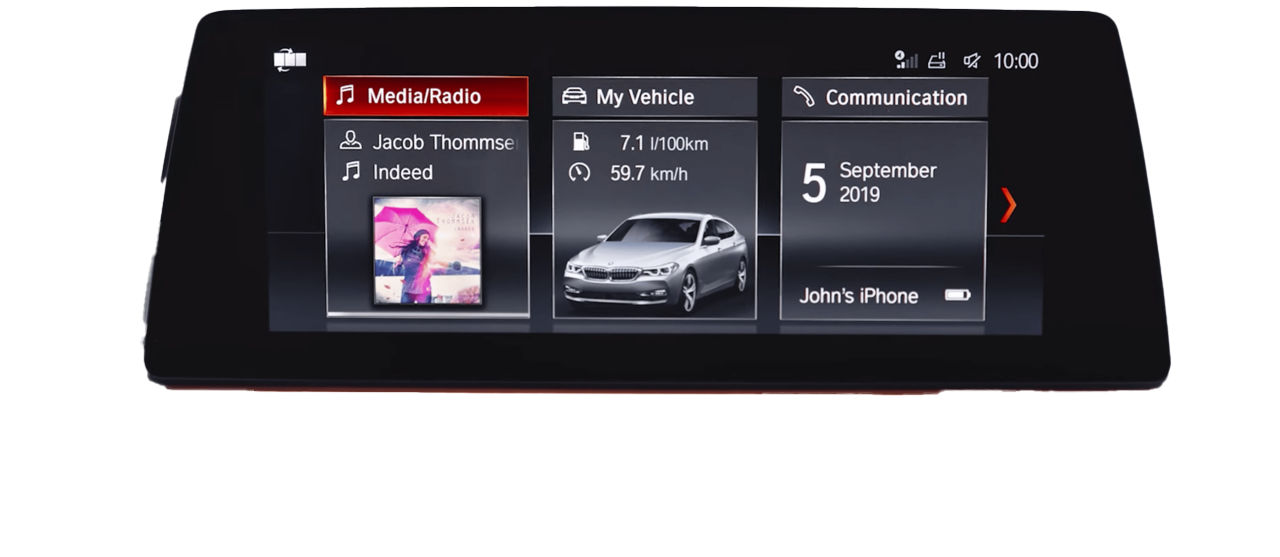
How to Identify NBT EVO:
- Screen: 6.5", 8.8", or 10.25" high-resolution display
- Graphics: Modern flat design with live tiles
- Controller: Touch-sensitive controller with gesture support
- Menu Style: Card-based interface with live information
Key Characteristics:
- Apple CarPlay ready (via coding or subscription)
- Touch screen support on 10.25" Professional displays
- Gesture control (wave to answer calls, etc.)
- Enhanced ConnectedDrive services
- Over-the-air software updates
CarPlay Options:
Native CarPlay: YES - Can be enabled via coding!
Our Service:
- CarPlay activation via software coding: €120
- Takes approximately 30 minutes
- Fullscreen wireless CarPlay support
MGU (Media Graphics Unit) - iDrive 7.0
Years: 2019-2022 Models: G20, G21, G22, G23, G26, G42, G05, G06, G07, G14, G15, G16, G29 (Z4)
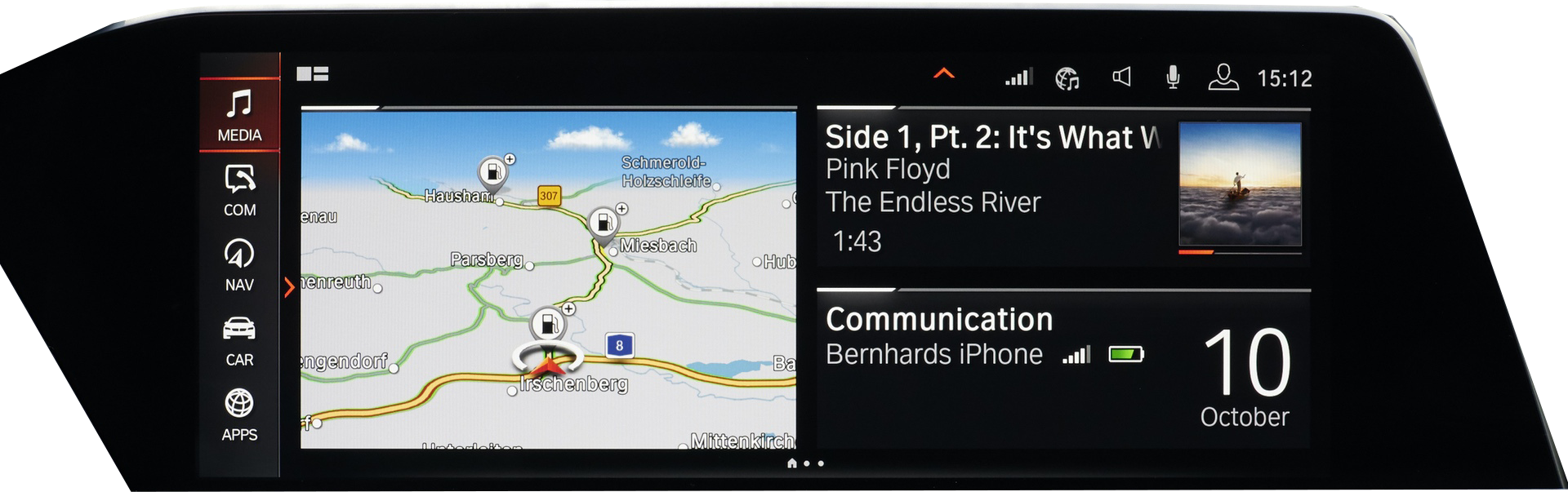
How to Identify MGU:
- Screen: 10.25" or 12.3" curved display (Live Cockpit Professional)
- Operating System: BMW Operating System 7.0
- Graphics: Completely redesigned modern interface
- Digital Cluster: Full digital instrument cluster standard
- Menu Style: Widget-based with customizable home screen
Key Characteristics:
- Native Apple CarPlay and Android Auto (wireless)
- Digital instrument cluster with navigation
- Intelligent Personal Assistant ("Hey BMW")
- Over-the-air updates standard
- Cloud-based navigation
- Wireless smartphone connectivity
- BMW Digital Key capability
CarPlay Status:
Native CarPlay: YES - Built-in from factory (may require subscription activation)
Our Service:
- CarPlay activation/subscription bypass: Contact us for pricing
- Feature coding and customization available
iDrive 8 / BMW OS 8 - ID8
Years: 2022-2024 Models: i4 (G26), iX (I20), 7 Series (G70), X7 LCI, i7

How to Identify iDrive 8:
- Screen: Massive curved display (14.9" infotainment + 12.3" cluster)
- Display Style: Integrated curved panel combining both screens
- Graphics: BMW OS 8 with completely new design language
- Climate: Minimalist physical controls, most functions in screen
- Interior: Drastically simplified dashboard design
Key Characteristics:
- Curved single-panel display design
- 5G connectivity
- Advanced voice assistant with natural language
- Augmented reality navigation
- Enhanced heads-up display
- BMW Digital Key Plus (Ultra-Wideband)
- Zero-layer home screen concept
CarPlay Status:
Native CarPlay: YES - Built-in, wireless only
Our Services:
- Feature coding and customization
- Software updates and optimization
- Consultation for hidden features
iDrive 8.5 / BMW OS 8.5 - ID8.5
Years: 2024+ Models: New 5 Series (G60), New X3, updated 7 Series
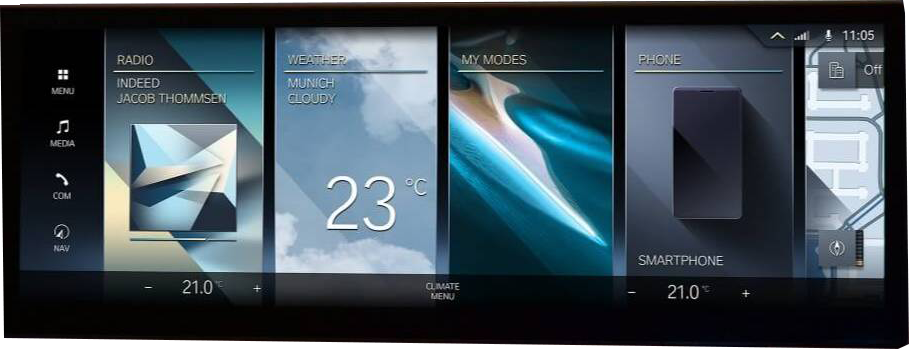
How to Identify iDrive 8.5:
- Display: Updated curved display design
- QuickSelect: New radial menu system
- Graphics: Refined BMW OS 8.5 interface
- Controls: Return of some physical buttons (climate)
Key Characteristics:
- QuickSelect radial menu for faster navigation
- Improved voice assistant responses
- Enhanced augmented reality features
- Refined user interface based on feedback
- Physical climate controls returned
CarPlay Status:
Native CarPlay: YES - Built-in wireless CarPlay and Android Auto
Quick Reference: CarPlay Compatibility
| System | Years | CarPlay | Solution | Price |
|---|---|---|---|---|
| CCC | 2001-2008 | No | MMI Box or Aftermarket Screen | From €350 |
| CIC | 2008-2012 | No | MMI Box or Aftermarket Screen | From €350 |
| NBT | 2012-2016 | No | MMI Box / Aftermarket / EVO Retrofit | €250-€1,200 |
| NBT EVO ID4 | 2015-2016 | Yes | Software Flash to ID5/ID6 | €350 |
| NBT EVO ID5/ID6 | 2016-2019 | Yes | Coding Activation | €120 |
| MGU | 2019-2022 | Yes | Factory Enabled | - |
| ID8 | 2022-2024 | Yes | Factory Enabled | - |
| ID8.5 | 2024+ | Yes | Factory Enabled | - |
Need Help Identifying Your System?
Still not sure which iDrive system you have? We're here to help:
Send us a photo of your iDrive screen and controller, and we'll identify your system and explain your upgrade options.
WhatsApp us for quick assistance - we typically respond within minutes during business hours.
Tags:
Subscribe to Our Blog
Get the latest BMW tips, coding guides, and performance insights delivered to your inbox.
We respect your privacy. Unsubscribe at any time.
Need Expert BMW Service?
Get in touch for professional servicing, coding, and performance upgrades
Contact Us